When Repositories Become the Attack Surface: Understanding npm and Git Supply-Chain Malware
Modern supply-chain attacks can hide inside trusted developer workflows, repositories, build configs, tokens, and automation. Here is what teams need to understand, how to spot warning signs, and how to respond safely.
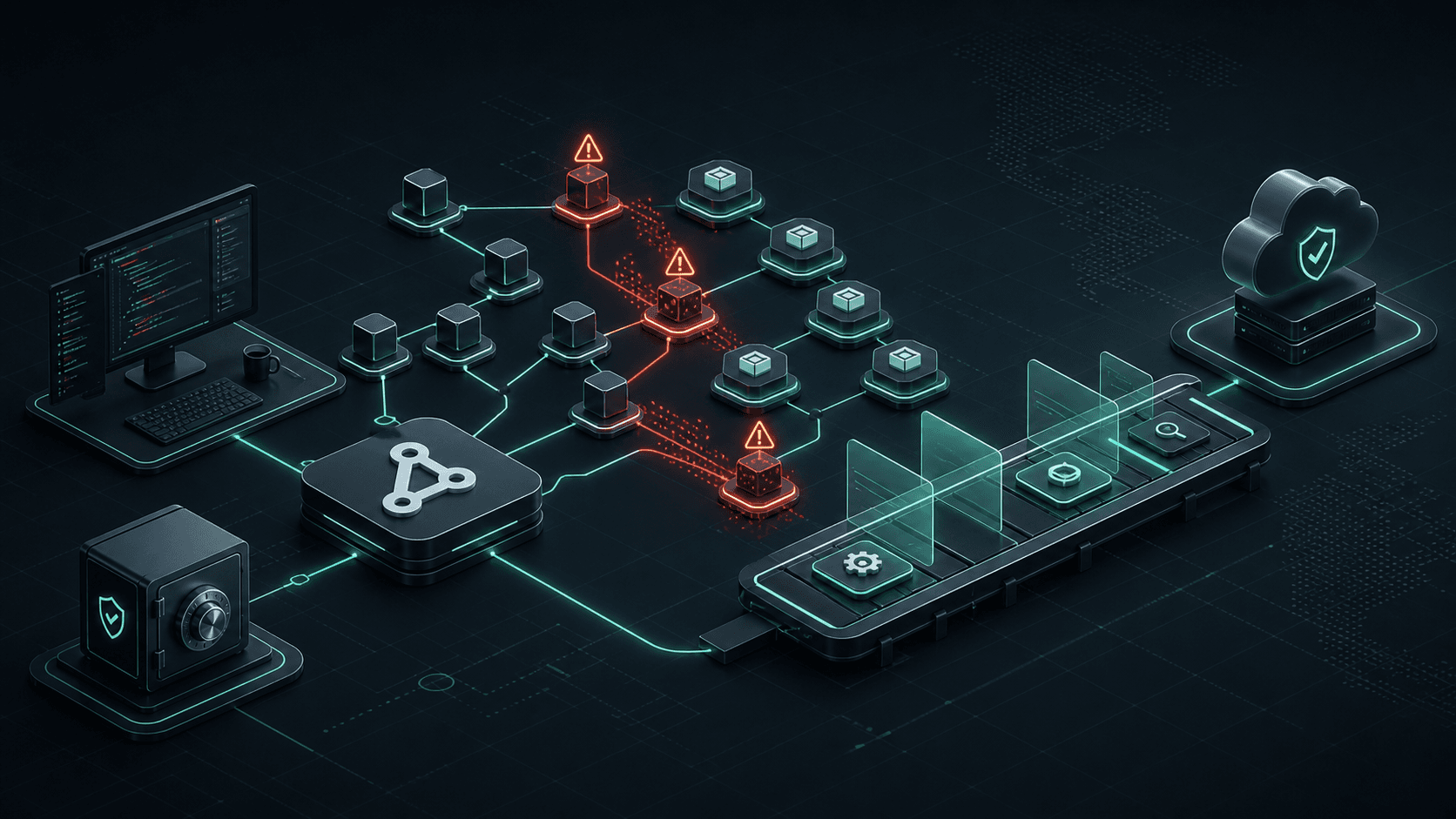
Executive Summary
Software supply-chain attacks are dangerous because they do not always begin with a direct attack on production infrastructure. They can start inside trusted developer workflows: a repository, an npm dependency, an editor task, a build configuration, a CI/CD workflow, or a stolen access token.
The incident notes behind this article describe a practical example of this risk: malicious behavior spreading through Git repositories and npm-based projects, with reinfection occurring even after a clean operating system reinstall because the compromised repository itself remained the carrier.
Readers will learn how these attacks can hide inside normal engineering activity, what warning signs teams should look for, and how to respond responsibly. For modern businesses, this matters because developer environments, automation systems, and source repositories are now part of the operational security boundary.
Introduction
Modern software teams build on trust.
They trust open-source packages. They trust internal repositories. They trust editor settings, CI/CD pipelines, build tools, deployment scripts, and the credentials that connect all of those systems together.
That trust is what makes software development fast. It is also what makes software supply-chain attacks so disruptive.
A traditional security incident might begin with a compromised server or an exposed application endpoint. A supply-chain incident can begin much earlier: when a developer opens a project, installs a dependency, runs a build, or pushes code. The attack surface is no longer just the application. It includes the entire path by which software is created, tested, packaged, and deployed.
The incident notes behind this article describe an npm and Git repository compromise pattern where malicious behavior appeared to spread through development workflows, repository files, stolen credentials, and automated changes. The important lesson is not the specific attacker. It is the broader engineering reality: repositories can become carriers, and development automation can become an execution path.
The Problem
Software supply-chain malware is difficult to detect because it hides inside systems developers already trust.
A package install is normal. A build configuration file is normal. A GitHub workflow is normal. A project-specific editor task may look normal. A commit from a familiar account may appear normal at first glance.
That is why these incidents can become confusing. Teams clean a machine, reinstall the operating system, or remove an obvious suspicious file, only to see the problem return. In the provided notes, the key realization was that the compromised repository itself could reintroduce the malicious behavior. A fresh machine did not solve the issue if the cloned project still contained infected configuration or build files.
This is the uncomfortable part of supply-chain security: the trusted development path can become the delivery mechanism.
What Teams Need to Understand
A software supply chain includes every external and internal component your software depends on: packages, repositories, build tools, CI/CD workflows, deployment scripts, credentials, developer machines, and automation platforms.
In npm-based projects, build and configuration files can execute code during normal workflows. That means malicious code does not always need a user to run an obviously suspicious command. It may execute when a development server starts, when a build runs, or when tooling loads project configuration.
Git repositories can also carry risk. A repository is not just source code. It may include editor settings, task definitions, hooks, CI/CD workflows, submodules, package scripts, and configuration files. Some of these are intended to automate developer work. If abused, they can automate compromise.
Credentials make the problem worse. A stolen GitHub token, OAuth grant, SSH key, npm token, or deploy key can allow changes to be pushed remotely. GitHub's own documentation says personal access tokens should be treated like passwords, and recommends fine-grained tokens where possible because they can limit access by owner, repository, and permission scope.
This is why the response must include both code cleanup and identity cleanup. Removing suspicious code is not enough if the attacker still has a valid credential.
Practical Signs, Symptoms, and Patterns
Teams should investigate carefully if they see patterns such as:
- Unexpected changes to build configuration files such as Vite, PostCSS, package scripts, or similar project startup paths.
- Obfuscated JavaScript or unusual dynamic execution patterns inside files that should be simple configuration.
- Unexpected
.vscodetask configuration, especially tasks that run when a folder is opened. - Repeated reinfection after a repository has supposedly been cleaned.
- Commits appearing without normal developer activity.
- Unverified commits appearing where the team normally expects signed or verified commits.
- Mismatched commit metadata, unusual timestamps, or commit history that appears rewritten.
- Unexpected GitHub Actions workflows, deploy keys, webhooks, OAuth apps, or GitHub App installations.
- Branches or pull requests that imitate trusted automation, platform fixes, or familiar bot activity.
- Suspicious additions to ignore files that hide scripts or generated files from casual review.
- Clean local work being overwritten after pushes or force-pushes.
For VS Code specifically, automatic tasks can be configured to run when a folder opens. That feature has legitimate uses. The security lesson is that teams should treat workspace automation as executable behavior, not harmless metadata.
Recommended Response and Best Practices
If a team suspects this kind of compromise, the response should be calm, structured, and defensive.
- Contain the environment. Stop running the affected project. Avoid executing package scripts, build commands, editor tasks, or unknown files from the repository. If possible, isolate the machine from sensitive systems while evidence is reviewed.
- Assume credentials may be exposed. Revoke and rotate relevant GitHub tokens, npm tokens, cloud keys, deploy keys, SSH keys, OAuth grants, and CI/CD secrets. Review active sessions and connected applications.
- Audit repository access paths. Check webhooks, deploy keys, GitHub Actions workflows, branch settings, protected branches, recent pull requests, recent commits, and repository collaborators. Review organization-level access too, not only the affected repository.
- Restore from a known-good state. Do not simply delete the most obvious suspicious snippet and continue. Review the full diff history, package files, lockfiles, build configs, workflow files, editor settings, hooks, and scripts.
- Harden the repository. Branch protection can require pull request reviews, status checks, signed commits, linear history, and restrictions around force pushes or direct pushes.
- Improve dependency discipline. Use lockfiles, review dependency changes, and prefer clean CI installs such as
npm cifor automated environments.
Finally, verify current guidance against authoritative sources. Security platform behavior changes. GitHub, npm, VS Code, and CI/CD providers update features and defaults over time. Incident response should always be checked against current vendor documentation.
Common Mistakes to Avoid
- Treating the compromised laptop as the only problem.
- Cleaning visible malware without rotating credentials.
- Underestimating editor and workspace configuration.
- Relying only on manual review for obfuscated code or noisy dependency diffs.
- Weakening controls after an incident in the name of velocity.
The better approach is to design security controls that fit normal engineering workflows.
Why This Matters for Businesses
For businesses, supply-chain malware is not only a technical problem. It can become an operational problem.
A compromised repository can slow engineering work, interrupt releases, create uncertainty around product integrity, expose secrets, and damage customer trust. If CI/CD pipelines or deployment credentials are involved, the blast radius can extend from developer laptops into production systems.
There is also a governance issue. Business leaders increasingly need confidence that software was built from trusted sources, reviewed by authorized people, and deployed through controlled processes. Weak repository hygiene becomes a business risk because source control is now part of the company's security perimeter.
For startups and growing teams, the lesson is especially important. The same automation that helps a small team move quickly can create hidden risk if it lacks guardrails, visibility, and recovery plans.
Engineering Lessons
- Security should be designed into the development workflow early.
- Automation needs observability.
- Repositories need recovery plans.
- Credentials should be short-lived, scoped, and rotated.
- Technical debt becomes business risk.
- AI and automation systems need the same discipline.
Agentic workflows, CI automations, internal tools, and AI-enabled development pipelines should be designed with permissions, logs, review gates, rollback paths, and human oversight.
How Nousheen Solutions AI Thinks About This
At Nousheen Solutions AI, we see this as a production-readiness problem as much as a security problem.
Reliable software is not only about features. It is about understanding how systems behave under stress, how automation can fail, how credentials are protected, how teams recover, and how engineering decisions affect business continuity.
That mindset matters when building AI systems, agentic workflows, automation platforms, and production-grade software. The more powerful the automation, the more important the guardrails: clear permissions, strong observability, secure defaults, reviewable changes, and recovery paths.
Conclusion
Supply-chain malware is effective because it hides inside trust.
The right response is not panic. It is disciplined engineering: verify repositories, rotate credentials, harden workflows, monitor for suspicious changes, and treat developer tooling as part of the security boundary.
Strong software is not just about shipping features. It is about reliability, security, and operational maturity. If your team is building AI, automation, or modern software systems, these same principles apply from day one.
Practical Checklist
- Pause use of any suspicious repository until reviewed.
- Do not run unknown package scripts, build tasks, editor tasks, or workflow files.
- Revoke and rotate GitHub, npm, cloud, SSH, OAuth, and CI/CD credentials.
- Review GitHub sessions, OAuth apps, GitHub Apps, deploy keys, and webhooks.
- Audit recent commits, branches, pull requests, force pushes, and workflow changes.
- Inspect build configs, package files, lockfiles, editor settings, hooks, and CI files.
- Restore from a known-good commit or backup when possible.
- Enable branch protections, required reviews, status checks, and force-push restrictions.
- Use secret scanning and rotate any exposed credential immediately.
- Use lockfiles and clean CI installs for dependency consistency.
- Keep npm, GitHub, VS Code, and CI/CD security guidance under regular review.
- Bring in professional incident response support when scope or confidence is unclear.
Key Takeaways
- Supply-chain attacks often spread through trusted developer workflows.
- A repository can become the carrier, even after a machine is wiped.
- Credential rotation is as important as code cleanup.
- Editor tasks, build configs, and CI/CD workflows should be treated as executable surfaces.
- Branch protection, signed commits, reviews, and secret scanning reduce silent tampering risk.
- Automation improves speed, but only when paired with observability and guardrails.
- Secure engineering is a business continuity practice, not just a security team concern.
Engineering Maturity
Strong software comes from technical judgment, not just implementation speed.
Nousheen Solutions AI brings that same production-minded approach to AI systems, automation platforms, and custom software workflows.
Talk About Secure Engineering