Building Syncly: Cross-Tool Business Automation
How Nousheen Solutions AI built a production-oriented platform for creating AI agents that connect to business tools, automate multi-step workflows, and give teams visibility into agent activity.
Executive Summary
Syncly is an AI agent workflow platform designed to help organizations create, configure, launch, and monitor AI agents that work across their existing business tools. Instead of forcing teams to switch between apps, dashboards, and manual handoffs, the platform lets users connect integrations, attach communication channels, configure agent behavior, and interact with agents through chat or webhooks.
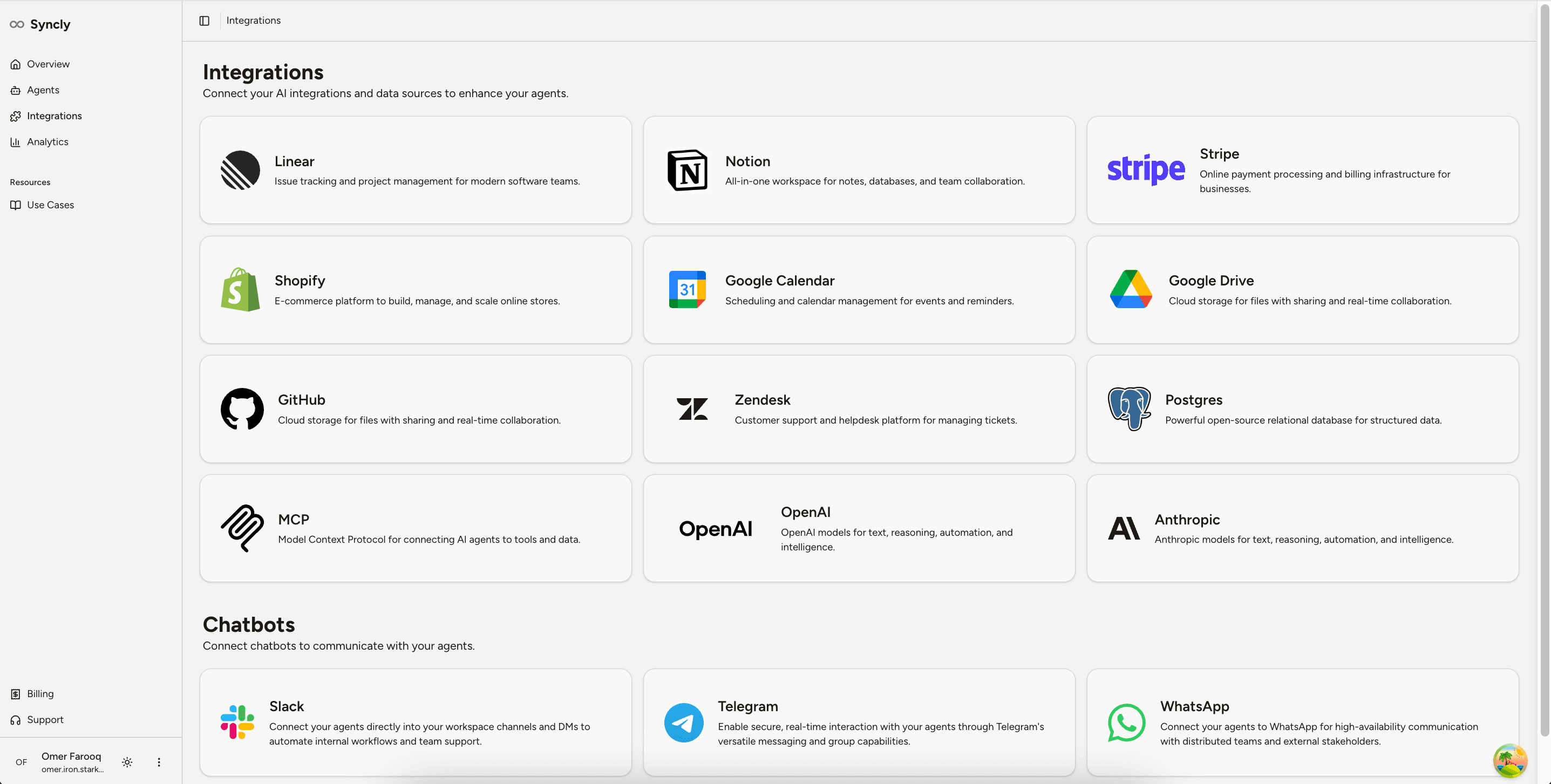
The product is especially relevant for operations, support, GTM, revenue, and technical teams that rely on multiple systems to get work done. It supports tools such as Linear, Notion, Shopify, Google Calendar, Google Drive, GitHub, Zendesk, Postgres, Slack, Telegram, WhatsApp, OpenAI, Anthropic, and custom MCP servers.
For enterprise and operational teams, the value is clear: faster task execution, fewer manual handoffs, better workflow consistency, and visibility into how AI agents are being used. The project demonstrates Nousheen Solutions AI's ability to turn AI from a standalone chatbot into a production-ready automation layer connected to real business systems.
Key Features
Key product capabilities built around real workflows.
Agent Builder
Create named AI agents and attach business integrations through a guided workflow.
Integration Catalog
Connect tools including Linear, Notion, Stripe, Shopify, Google Calendar, Google Drive, GitHub, Zendesk, Postgres, OpenAI, Anthropic, and custom MCP servers.
Chatbot Channels
Deploy agents through Slack, Telegram, and WhatsApp for conversational workflow execution.
Custom MCP Support
Connect agents to proprietary tools, internal APIs, or custom data systems using Model Context Protocol patterns.
Agent Playground
Test agent behavior in real time before wider team or workflow deployment.
Analytics Dashboard
Track messages, active users, estimated time saved, messaging channels, and integration usage.
Introduction
Modern teams run on a growing stack of tools: CRMs, support platforms, calendars, project trackers, internal databases, messaging apps, file systems, and custom operational systems. The challenge is not only that work is spread across these platforms. The bigger problem is that people still have to manually move information, check statuses, create follow-up tasks, and coordinate actions across disconnected systems.
Syncly was built to solve that problem with AI agents that can operate across an organization's toolchain. It gives teams a practical way to create agents, connect them to business systems, test them, deploy them through chat or webhooks, and monitor usage over time.
The Business Challenge
Most automation efforts fail when they are too narrow. A single chatbot may answer questions, but it cannot execute work. A single workflow script may automate one process, but it often breaks when the business changes. Enterprise teams need systems that can reason across context, call the right tools, handle multi-step workflows, and still remain configurable by humans.
Syncly addresses this gap by combining agent configuration, tool integrations, communication channels, and analytics into one operational platform.
The Product We Built
Nousheen Solutions AI built a platform where users can create AI agents and connect them to the systems they already use. Each agent can be configured with selected integrations, an LLM provider, optional chat channels, custom instructions, and webhook access.
The platform includes an overview dashboard, agent management, integration setup, credential workflows, an agent playground, use-case guidance, and analytics for monitoring messages, users, estimated time saved, channel usage, and tool usage.
How It Works
A user creates an agent, selects the required integrations, chooses an LLM provider, adds credentials, and optionally connects chat channels such as Slack or WhatsApp. The user can also define custom instructions so the agent behaves according to the team's workflow.
Behind the scenes, the system creates and activates an automation workflow, routes user requests to the right connected tools, executes multi-step actions, and stores activity data for analytics. Users can interact with the agent through the web playground, chat channels, or API and webhook calls.
For example, a team member could ask an agent to retrieve Linear issues, schedule a calendar event, find a file in Google Drive, or coordinate a support-to-engineering handoff. The system handles the tool calls and returns a usable response.
Why This Demonstrates Our Capability
Syncly is a strong example of Nousheen Solutions AI's core promise: building production-ready AI and agentic systems that help businesses automate workflows, improve decision-making, and scale operations.
The project shows that Nousheen Solutions AI can understand business workflows, design usable internal tools, integrate AI into existing systems, and build automation products that support real operational needs. It moves beyond prompt demos and into the practical work of credentials, integrations, testing, deployment, and analytics.
Future Opportunities
- CRM integrations for lead routing, pipeline updates, and account research.
- Advanced admin permissions and team-based access controls.
- Approval workflows for sensitive actions before agents write to external systems.
- Richer analytics, audit logs, and operational reporting.
- Slack and email summaries for completed workflows and pending handoffs.
- Voice assistant workflows for support, sales, and internal operations.
- Enterprise deployment controls for larger teams and regulated environments.
Proof Points
- Agent creation and management workflow.
- Integration catalog across SaaS tools, LLM providers, chat channels, databases, and MCP servers.
- Web playground for testing agent behavior.
- Webhook-based deployment for connecting agents to external systems.
- Slack, Telegram, and WhatsApp chatbot support.
- Custom system prompts for workflow-specific behavior.
- n8n workflow creation, activation, update, and deletion.
- Credential ownership validation and provider-specific credential setup.
- Analytics for messages, users, estimated time saved, messaging distribution, and tool usage.
Build Something Similar
Turn AI into a working automation layer across your business tools.
Nousheen Solutions AI can help design and build a system tailored to your workflows, data, channels, and operational guardrails.
Build Your AI Workflow System